
Sell online and fill your tasting room, from one system
Your online shop shouldn’t be a separate world from your tasting room or taproom. With QUALO, your web store, reservations, club and POS share the same inventory and customer records, so every order and booking lands in the right place. Staff work from one customer list and one stock count, whether a sale starts online or at the counter.
Branded shops, as many as you need
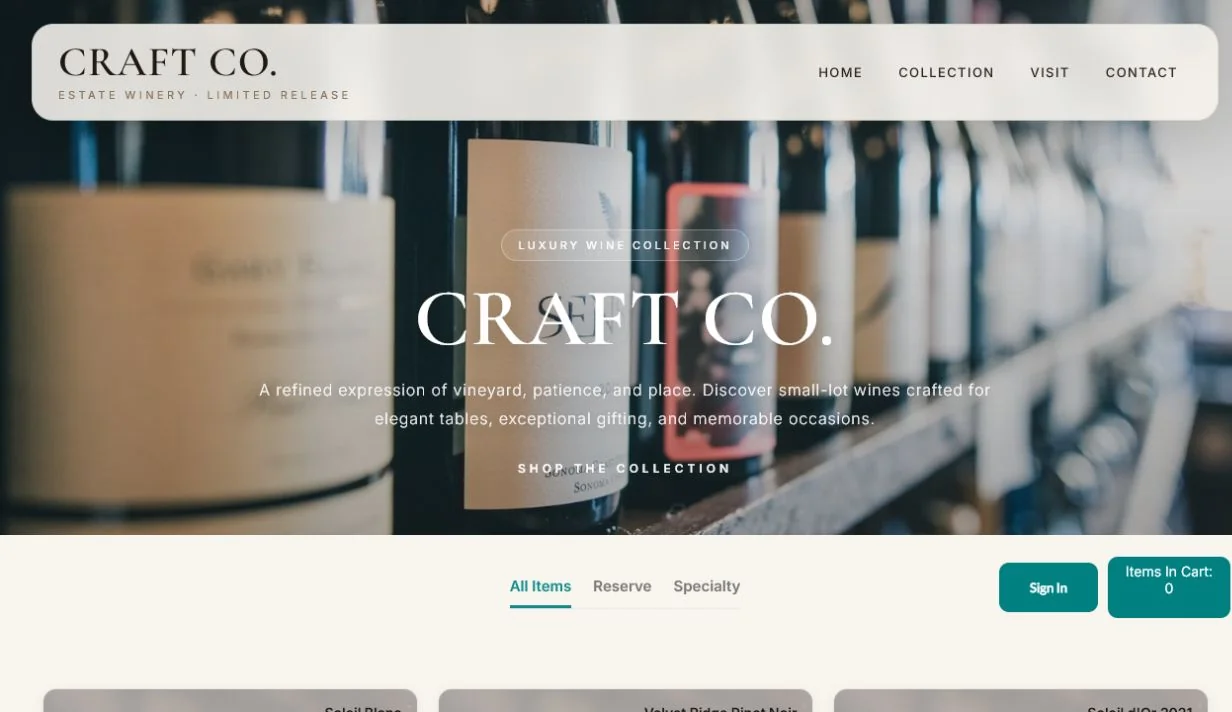
Launch online stores on myqualoshop.com with your own header, footer and sections. Create several shop links, for example one per location or one for a members-only release, each with its own URL and QR code, and make any of them public or restricted.
Each shop link is tied to a customer type, a product division and the inventory location it sells from, so a members-only link shows member prices and draws stock from the right place. Sections group items in the order you want customers to see them, and you choose how many items sit side by side. Headers and footers take your own HTML, styles and fonts, so the shop can match your website. Each link can also email your team when a new order or a new shop account comes in.
If you haven’t added a custom layout yet, the shop shows your company logo, so a new link still looks like yours. On Shop Layout you drag sections and item groups into the order you want, and each shop section can have its own header, styling and fonts, so a holiday section can look different from the rest of the shop. New-order notification emails show the invoice number in the subject and the customer’s name in the message.
Products that sell themselves
Each shop item comes straight from your inventory with its description, image, size and deposits. Group items into sections and set maximum order quantities for limited releases.
Add the details customers look for, such as tasting notes, food pairings, maker notes, awards and alcohol percentage, plus a coloured attention label that makes an item stand out. You decide what happens when stock runs out: stop selling when nothing is available, or keep the item on display but not for sale. Items can also be set to appear only on club and subscription orders. Because every shop item is linked to a real inventory item, an online sale comes out of the same stock your tasting room or taproom sells from.
Choose a display layout for each item, from a full card with image, name, description, unit and price down to just the price or just the image. Item pages can also show cases produced, cellaring potential, appellation, residual sugar, sweetness scale and grower. To sell a mixed case or gift set, build a shop item group of up to 12 items, each with its own quantity and price, and customers add the whole set to their cart in one click.
The right price for every customer
Club members, trade and VIP customers see their own pricing automatically, including contract pricing, online just as in person.
Prices are set by customer type, so each group sees the price you’ve set for them once they sign in. A contract price agreed with a single account applies when that account orders online too. Because each shop link carries a customer type, you can share a link with one group, such as your members, and know they’ll see the right prices from the first page. There’s no second price list to keep in step with the POS.
When a signed-in customer’s price differs from the shop’s usual price, because of their customer type or a contract, the usual price shows crossed out beside theirs, so members see what they’re saving. A contract price can be a new price, a percentage off or a dollar amount off, with optional start and end dates, for one customer, a customer type or a customer category. Loyalty tiers can also take a percentage off by product division, labelled on the item.
A checkout that works
Customers sign in or sign up with their email, choose pickup or shipping, and reuse saved addresses. QUALO re-checks the address and shipping zone before payment, so rates and taxes match where the order is actually going. Shipping rates can be set by destination, customer type, order value or weight, and taxes by destination.
Checkout starts with the email address, so a returning customer signs in to their existing account instead of creating a second one, and their order history, member pricing and saved card stay together. Shipping zones match an address by city, postal code, province or country, and pickup can be offered as its own choice. The cart shows the subtotal, deposits and any promo code before payment, and the confirmation page gives the customer an order reference they can find again in their account.
Customers can add a short note in Ship To Instructions, such as where to leave a box, and it’s saved to the invoice so your team sees it when packing. They can also edit a saved shipping address right at checkout. If no shipping zone covers an address, checkout says so and asks them to choose pickup instead, and once the order goes through, QUALO emails a checkout confirmation when automatic emails are turned on.
Promotions, gift cards and loyalty
Run promo codes with dates, minimum quantities and eligibility. Sell electronic gift cards online with a recipient and message, redeemable online or in person. Members redeem loyalty points at checkout.
A promo code takes a percentage off between the dates you set. You choose which customer types can use it, whether it covers selected items or a whole product division, and the minimum quantity needed to qualify. When someone buys a gift card, they enter their own name and email, the recipient’s name and email, the amount and a personal message, and the recipient gets the card by email. Signed-in customers with loyalty points can choose to use them on the order, following the rules you set for your program.
Customers enter a promo code or a gift card code in the same box at checkout. A gift card doesn’t have to be spent all at once: QUALO takes what the order needs and keeps the rest on the card for next time. Each card gets its own code automatically, and the buyer receives an email with the invoice attached. For loyalty, you choose whether points are earned and redeemed online, in store or both, and when they expire.
Book tastings, tours and experiences online
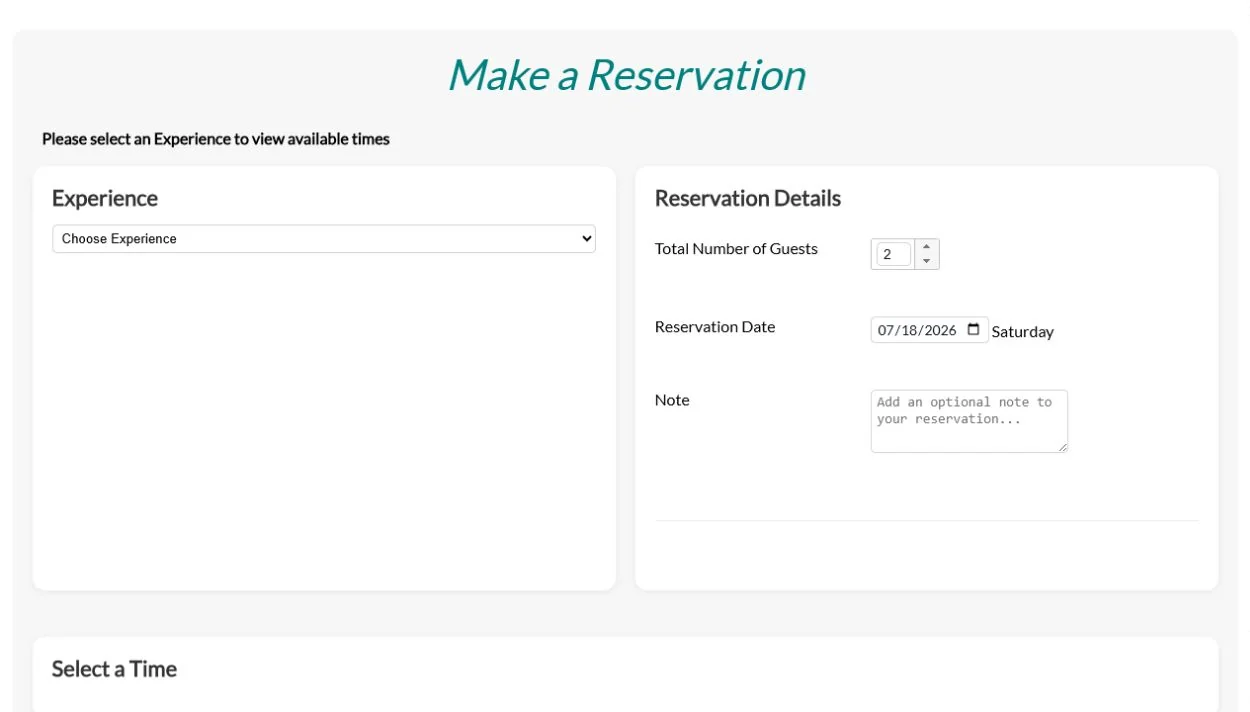
Publish experiences with set capacity and share them by link or QR code. Restrict special experiences to selected guests, and take payment up front. Guests see their bookings under My Reservations. On the day, the booking flows into the POS and checks out automatically.
Each experience has its own description, image, length, guest limit and fee, and fees can change by day of the week. Experiences that use the same space can share one guest limit, so they can’t overbook it between them. Set how far ahead guests must book, turn off same-day bookings, or hide an experience from public booking while staff can still book it. Reservation codes give a percentage off for a set date range, and your team can get an email for each new booking or cancellation.
Each experience has its own weekly hours, with up to five time blocks a day and a Copy button to repeat one day’s times on another. Save a new schedule with an effective date and bookings from that date follow it, so you can set summer hours in the spring. Each experience can carry its own taxes, and for walk-ins, staff add a reservation, pick an open table and check the party in at once.
Customers manage their own accounts
In the customer portal, customers update their profile and addresses, view order history and confirmations, and reset their own password.
The portal shows only the options you’ve turned on, such as Shop Online, My Profile, My Reservations, Make a Reservation, My Subscriptions, Subscribe, My Order Confirmation and My Order History. Customers can add or replace their card on file themselves, so staff don’t need to collect card details by phone or email. Each customer sees only their own account. When someone calls for help, staff open the same customer record in QUALO and see the same orders, bookings and subscriptions.
Guests can cancel a booking themselves from My Reservations, and QUALO can email them a confirmation of the cancellation. My Order History lists each invoice with its date, number, total, amount outstanding and payment, with a button to print a copy. On My Profile, customers can unsubscribe from your emails, and that choice is saved to the same customer record your staff use.
Email that brings them back
Design emails in the built-in designer, with image libraries for wineries, cideries, breweries and distilleries. Send campaigns to any segment, and track deliveries, opens and clicks, with unsubscribes handled for you.
You can also upload your own images. Choose your audience by customer type, category, province, club or rep, or find customers whose birthday or club anniversary is coming up. Preview the recipient list and send yourself a test before the real send. Afterwards, Email History shows what was delivered, opened, clicked or bounced, and the Marketing & Email dashboard shows how each template is performing. Customers who unsubscribe are kept off future campaigns.
Built for your industry: Winery Software · Cidery Software · Brewery Software
Your automatic emails can carry your design too: choose Custom Automatic Template and pick the email it replaces, such as the checkout confirmation, reservation confirmation, gift card or welcome email. Each template has a subject and preview text, and Copy starts a new template from one you like. Turn on Birthdate Required and new shop sign-ups give you their birthday, ready for your birthday campaigns.
Frequently asked questions
Do I need a separate website for my shop?
No. Your QUALO shop is hosted for you on myqualoshop.com, and you can link to it from your own website.
Does the online shop share inventory with my tasting room?
Yes. Every sale, online or in person, draws from the same live inventory.
Which payment processors work online?
Elavon (Converge) and Moneris. The same processors run your tasting room terminals, so card payments stay in one place.
Can guests book and pay for tastings online?
Yes, with capacity limits, restricted experiences and prepaid booking.
Can I bring my customers over from another platform?
Yes. QUALO imports order history from Commerce7 and WineDirect, and brings customers across with a customer import.
Can I offer a discount on tastings and tours?
Yes. Reservation codes take a percentage off bookings made within the dates you set.
Will my team know when an online order comes in?
Yes. Each shop link can send your staff a notification email for every new order.