
Production software, connected to everything you sell
Most producers run production in one system and sales in another, and reconcile the two by hand. With QUALO Production, what you make flows straight into the inventory you sell, and every step is traceable from raw ingredients to the packaged product. Work is recorded as it happens, so the people doing it and the managers planning it see the same picture.
Receiving
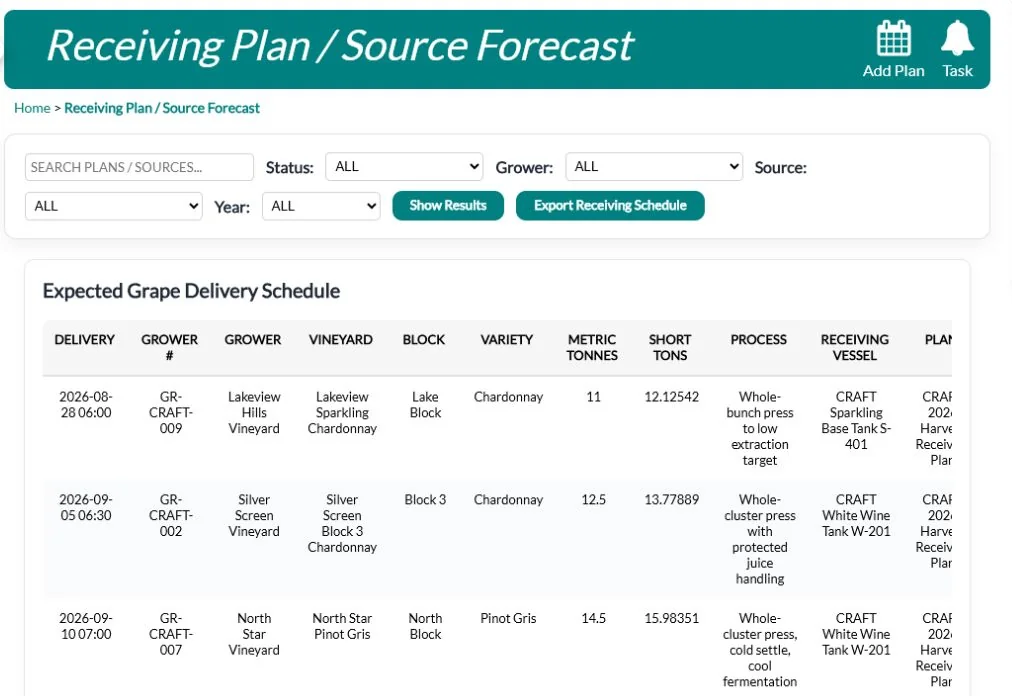
Keep source and grower records, plan receiving, and create lots the moment fruit, juice, grain or bulk liquid arrives, so every batch starts with its source recorded.
A receiving plan lists the expected bookings by grower, variety and quantity, and can be exported as a schedule for the crew. When fruit arrives, staff record the scale ticket, truck and carrier, weight, bins and readings such as Brix, pH and temperature, along with the grower contract and cost per unit. A photo can be attached when a load shows damage. Each receipt can create its batch on the spot and print a receiving slip. Other inputs are received against their source with the quantity, lot and quality readings.
Each source can list its vineyard blocks with varietal, clone and area, and each receipt line can name the block the fruit came from. Enter metric tonnes and QUALO fills in the short tons for you. In the receiving plan, every booking has a Create WO button that opens a grape receiving work order for the crew and a Create Receipt button for when the load comes in, and each receipt moves from Draft to Received, In Process and Complete.
Your vessels at a glance
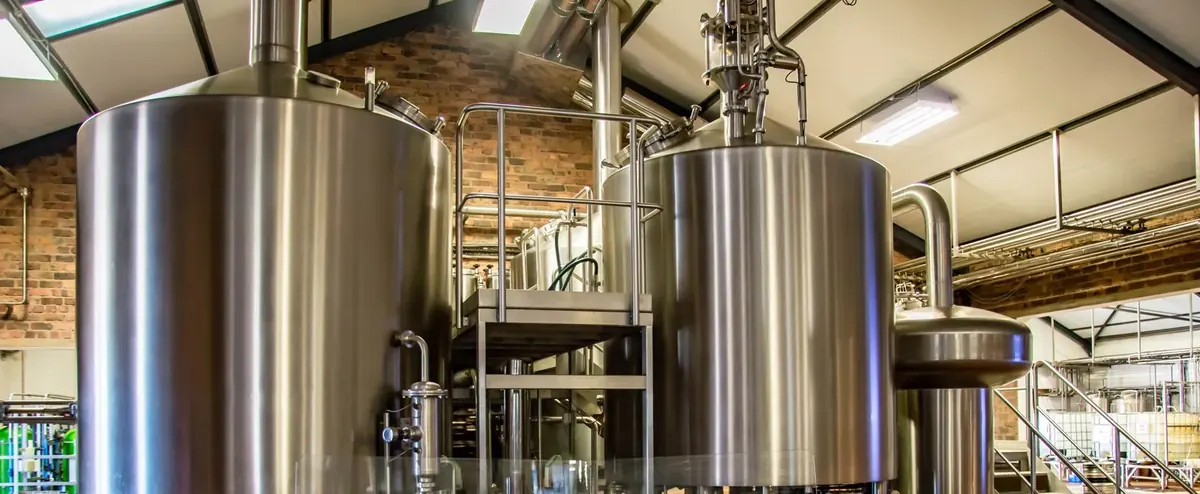
Set up tanks, barrels, totes, kegs and production rooms, and see where every batch is on a visual production map. Manage batches and lots with statuses and groups.
Each vessel records its capacity by volume or weight, and QUALO can warn staff when a vessel is already in use or would go over capacity. Barrels also keep their cooper, wood, toast, year, serial number and use count. On the production map you lay out each room by dragging vessels into place, and the map shows the batch in each one and the room’s total volume. Every tank and barrel can have a printed QR code, so a scan brings up the right vessel.
A batch can sit in more than one tank or barrel: Batch Detail lists each vessel with its volume, weight and fill percentage, and you choose which one is primary. Barrel groups gather a set of barrels under one name and show the batch in each. You set up your own batch stages and statuses, every stage change is kept in the batch’s stage history with a note, and a composition chart shows each batch’s varietal and vintage mix.
Operations made simple
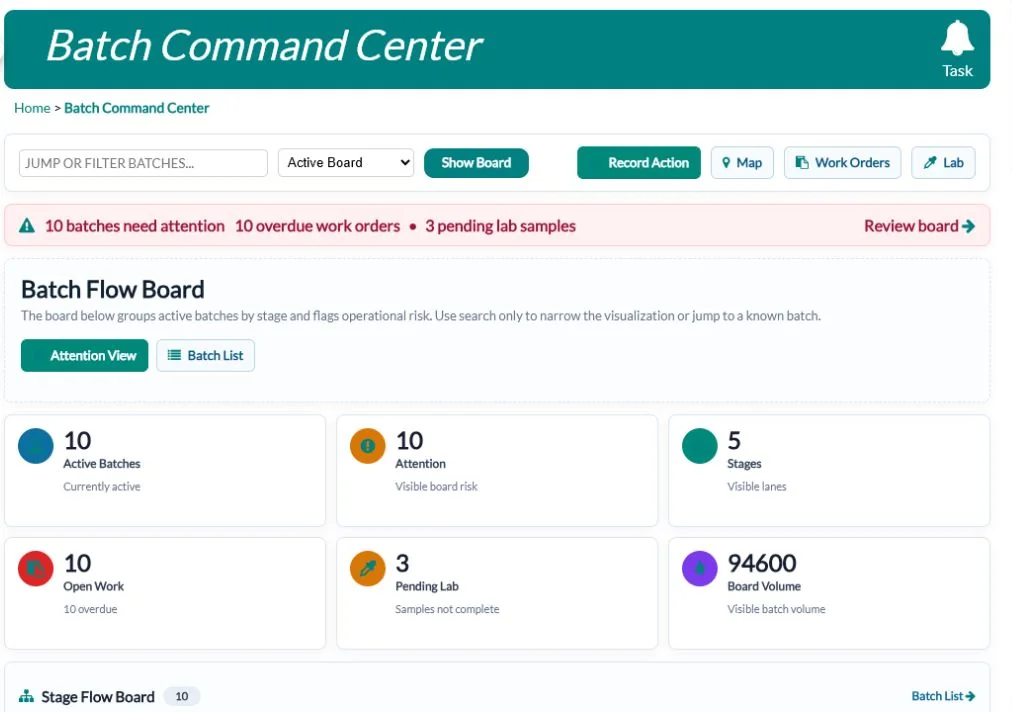
Guided steps record actions, transfers, blends and press operations correctly the first time. The production command centre and schedule show what’s happening now and what’s next, including materials you’ll need.
The transfer and blend screen covers transfers, blends, topping, racking, pressing, losses and gains, with measured loss recorded separately so every drop is accounted for. A blend keeps each component visible in the batch history. Drain and press records free-run and press fractions as separate outputs. The batch command centre flags batches with no vessel, overdue work or pending lab samples. The production forecast compares what each plan needs with what’s on hand and shows any supply shortfall before the work starts.
The Record Action screen shows the fields set up for the action you choose and won’t save until the required ones are filled in, and each action can be linked to its work order. On the Transfer / Blend screen, Add Another Tank/Barrel splits one movement across several destinations. Documentation Only records an event without changing any volumes, Affects Excise flags movements for your excise records, and Recent Movements lists each saved movement so you can check it right away.
Recipes and targets
Keep versioned recipes with targets such as Brix, gravity, ABV and pH, then create a production batch straight from a recipe.
Each recipe version holds its ingredient and additive lines, process steps, batch size and expected yield. Where your process uses them, add fermentation stages with days and temperatures, water profiles and water adjustment plans. Other targets include original and final gravity, colour, bitterness and carbonation. One version is marked active and older versions stay on file, so a batch always shows which version it was made from. Each recipe can be linked to the finished item it produces.
A recipe line can point to a supply item, so recipes use the same materials you buy and stock. Lines can be typed as ingredient, additive, fermentable, hop, yeast or packaging, and marked optional. When you create a batch from a recipe version, enter a scale and QUALO sets the planned volume to the recipe’s batch size times that scale.
Work orders your team will use
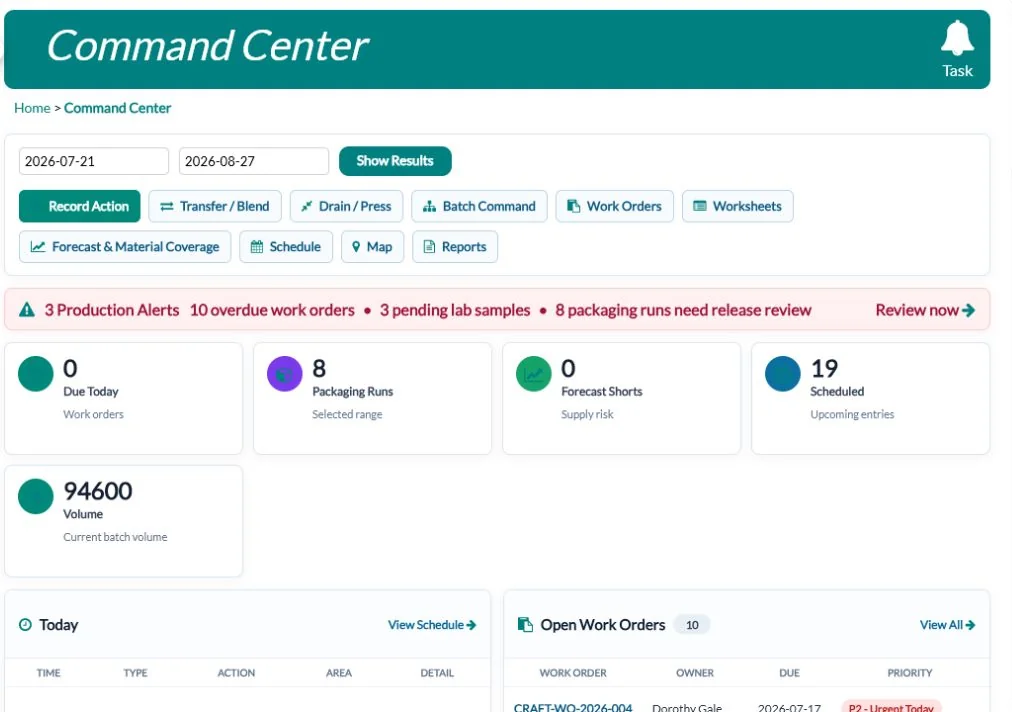
Assign work, track it on a work order board, and keep equipment on a maintenance calendar.
A work order names the batch and vessel, who it’s assigned to, the priority, the planned start and end, and written instructions. Jobs you repeat can start from a template. Staff start the work, log their labour time and complete it, or send it for approval when a manager needs to sign off. Equipment records hold the manufacturer, model, serial number, warranty and service schedule, with a maintenance log and calibration records for instruments that need them.
Break a job into work order lines, and mark a line as needing a volume or a note before it can be completed. Each work order shows estimated and actual minutes, the supplies it needs, the readings recorded against it and any packaging runs it covers. Labour entries take an hourly rate and a burden percentage and become a labour cost on the batch, and the Maintenance Calendar shows planned, due today, overdue and completed service by month.
Lab and quality release
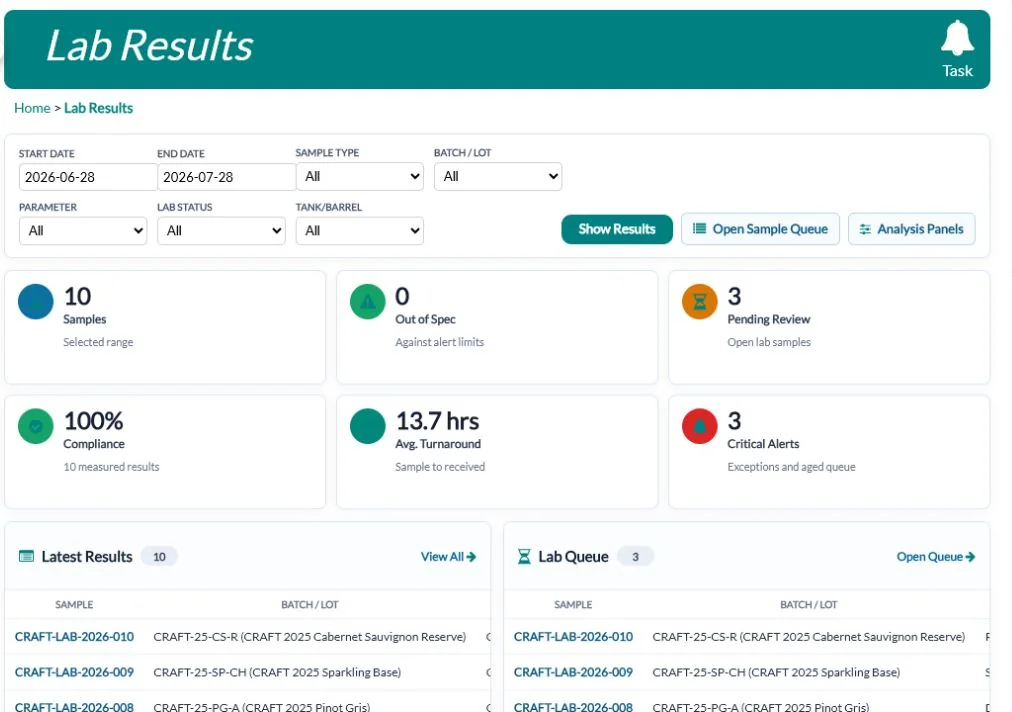
Record lab readings and samples, and add a sensory review and approval step before a batch is released for sale.
A lab sample tracks who pulled it, when it went to an outside lab, when it came back and the lab’s reference number. Readings are entered against the batch and vessel with their units, and reading types and worksheets keep repeat tests consistent from one batch to the next. Sensory reviews record each reviewer’s scores, can be run blind, flag faults, and show who approved the result and when. Documentation search finds any past reading by batch, type, stage or date.
The Lab Results page puts the lab’s work on one screen: the latest results next to their target range, a queue of samples still waiting with their priority and age, and trend lines for your most-tested readings. Set a minimum and maximum on a reading type, and any result outside it appears under Critical Exceptions. Release Readiness lists batches that still have tests pending, and each sample moves from Draft to Pulled, Sent, Received and Complete.
From packaging straight to sales
Packaging runs create lot-numbered finished goods, whether bottles, cans or kegs, that move directly into the inventory you sell from. No re-keying packaging numbers.
A packaging run records the batches used, the run date, each output’s created and rejected quantity, liquid and packaging loss, the supplies used and the related work order. Once the run is complete and approved, the release step moves the finished goods into the inventory location you choose, and QUALO won’t release more than the run produced. Kegs are tracked one by one, with serial number, size, deposit, the lot inside, where each keg is or which customer has it, and its cleaning and inspection history.
For each output, the run shows how many were created, rejected, held and released, and supply usage compares what was used with what was expected, recording any loss with a reason. On Finished Goods Release, the release must be approved, with the approver named, before goods are released, or you can keep them held. Once released, the record can’t be changed or deleted. Each keg’s cleaning log records the method, chemical, temperature, minutes and inspection result.
Full traceability
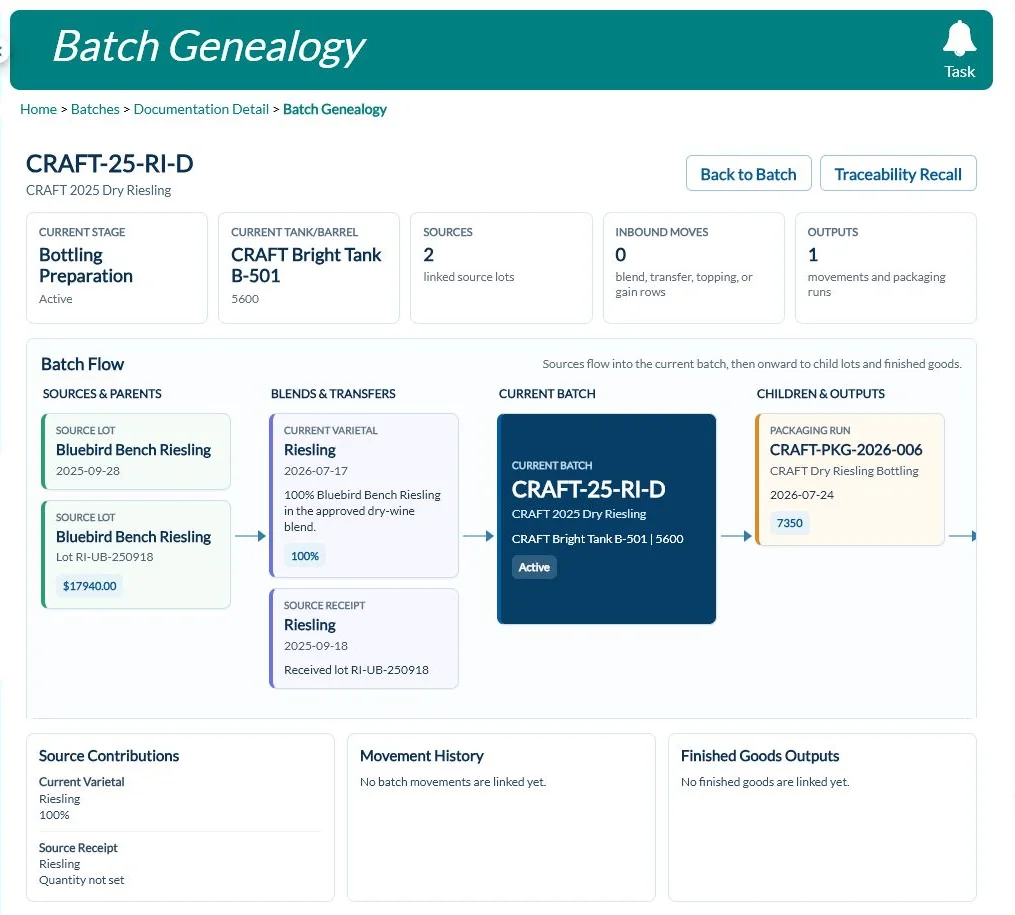
Batch genealogy and QR codes on vessels and batches mean you can trace any packaged lot back through every blend and transfer to its source, so a recall starts with the facts.
The genealogy page shows a batch’s sources and parent batches, what each contributed, the movements in between, and the packaging runs and finished goods that came out of it. A traceability search finds records by lot, batch, source or note. If something goes wrong, open a recall case and move it from Open to Investigating, Contained and Closed, with notes and attachments kept on the case so the whole response is on record.
Completing a packaging run writes the trace for each finished lot: the batches packaged, the sources and vineyard blocks behind them, and the packaging supply lots used. When product moves in a transfer or blend, the receiving batch takes on the source batch’s varietal, vintage and source mix along with its documentation. The traceability search shows each supply lot’s supplier lot number, expiry date and certificate of analysis, and a recall case can name the batch, item or supply lot involved.
Costing and compliance
Track costs by batch and see real margins against what each product sells for, with production audit reports built in.
Cost entries attach a cost to a source, batch, packaging run or finished item, and water, power, gas, steam and labour can be recorded against the work that used them. Cost snapshots freeze the cost of a batch or finished good at a point in time, such as packaging or month-end. The costing and margins dashboard points out missing costs and low margins. An excise register keeps your filing records by period, and production audit reports trace totals back to the source records behind them.
Costs build up as the work happens. A receiving line with a total cost adds a fruit cost to its batch, and when you complete a packaging run, QUALO takes a cost snapshot for each finished item, split into fruit, consumables, packaging, labour, overhead and other, and sets the cost per unit on the new lot. Cost entries can carry an invoice number and be marked approved, and Production Audit Reports can export an inventory CSV of bulk and packaged stock with quantity, tax class and value.
Supplies under control
Track additives, ingredients, packaging and labels with reorder points, transfers and valuation.
Each supply has its own unit, storage locations, SKUs and pack sizes, so a case received turns into the right count on the shelf. Purchase orders track what’s on order, and receiving records the lot, cost and any shortfall against the order. When an addition goes into a batch, it comes out of supply stock and shows in the batch history with the lot used. The supplies command centre brings open orders, deliveries and low stock together, and physical counts correct the balance with a reason recorded.
Built for your industry: Winery Software · Cidery Software · Brewery Software
Each supply can carry an addition formula, such as mg/L or g/hL, and when staff record an addition, Calculate works out the amount from the dose rate and the batch volume. A supplies assembly groups up to ten supplies, so a standard set of additions goes in together. Receiving lines hold the lot, manufacture and expiry dates and the landed unit cost, Transfer Supplies moves stock between locations with a printable packing slip, and the reorder and valuation reports export to a spreadsheet.
Frequently asked questions
Is production part of the same system as sales?
Yes. Finished goods move from packaging straight into sellable inventory, and every lot keeps the record of the packaging run that made it.
Can I trace a product back to its source?
Yes. Batch genealogy follows each lot from receiving through blends, transfers and packaging.
Does QUALO manage work orders?
Yes, with a work order board and an equipment maintenance calendar.
Can I send samples to an outside lab?
Yes. Each lab sample records when it was sent and received and the lab’s reference number, and results are entered against the batch.
Does QUALO track kegs?
Yes. Each keg has its own record with serial number, size, deposit, contents, location or customer, and cleaning and inspection history.