Wholesale, CRM and reporting for producers that sell everywhere
Tasting room or taproom, online, club and trade accounts: QUALO puts every channel in one place, so you always know who’s buying, what’s moving and what you’re owed. Wholesale orders, customer records and reports all draw on the same invoices, so your sales team, your bookkeeper and your liquor-board reports work from the same numbers.
Wholesale orders without the paperwork

A dedicated wholesale order screen captures the account, seller, location and PO number, and lets you invoice now and get paid later. Take pre-orders and returns on the same screen. Delivery tools cover packing slips with barcodes and weights, bills of lading and printing several invoices at once.
Pick the account, and its customer type, addresses, contacts, notes and saved payment methods come up with it. Add the products, and the screen shows each account’s price and the quantity available before you commit. Take payment on the spot, or choose Submit & Pay Later so the invoice waits in receivables. Delivery details, carrier and tracking can be added to the invoice, and a group of outstanding invoices can be marked paid together when a cheque or transfer covers several.
Tick Pre-Order when an account wants product before it’s released: the order saves without moving inventory, prints with Pre-Order beside the invoice number, and converts to a regular invoice when you’re ready. Tick Refund to take a return on the same screen, and the return invoice gets -R added to its number. At delivery, your driver can record the received date and name on the wholesale invoice and capture the buyer’s signature, which then shows on the invoice.
Pricing that follows the customer
Set prices by customer type, or agree contract prices with individual accounts. The right price applies automatically in wholesale, in person and online.
A contract price can cover a single item or a whole product division, with start and end dates so an agreement doesn’t carry on past its renewal. Allocations hold stock for a rep or a customer. Sales staff see the contract price and the available quantity on the order screen before they confirm anything with the buyer. The Price List report shows current prices by customer type and product division.
A contract price can be a new price, a percentage off or a dollar amount off, for one customer, a customer type or a customer category, and for single items, item groups or divisions. Contract-priced lines are marked CP on the order screen, and you can choose to show the amount off. A customer type can be set to hide discounts on printed invoices, and if several customer types share the same prices and taxes, Group Customer Types on the item screen updates them together.
Get paid and stay on top of receivables
Track invoices, payments and statements. Outstanding invoices, accounts-receivable aging and point-in-time AR reports show exactly who owes what.
The AR Aging report sorts unpaid balances into age buckets, so the oldest get attention first. Point-in-time AR shows what was owed on any past date, which helps at month-end and year-end. Statements can be pulled for one customer or by customer type, category or rep, then printed or emailed. Every payment is recorded against the invoice it pays, and the Invoices & Payments dashboard shows what was invoiced, what was collected and what’s still outstanding.
If an account keeps a card on file, you can collect from the Outstanding Invoice report: tick the invoices, click Send To Payment Processor, and choose whether the customer is emailed the invoice when a charge succeeds or declines. An invoice that was tried in the last 24 hours can’t be sent again from the report. The Credit Card Expiry list finds cards that run out by a date you pick, and Send Selected Billing Emails asks those customers to update them.
Support your sales team and agents

Credit each sale to the rep who made it, run commission reports and see staff performance. Allocate inventory to reps and accounts, and set monthly sales quotas for each rep or company. Sales agencies representing several producers get their own portal for invoices, commissions, customers and tasks.
Each customer can have a default rep for new orders. The Commission report runs by rep and date range, and can leave out invoices that haven’t been paid yet. The Staff Performance dashboard shows each person’s sales, transactions, average sale and tasks. In the agency portal, agency staff work in a space that’s separate from your own staff system, with sales and customer summaries in dollars or cases for each producer they represent.
Quotas give a rep or a company a monthly sales target, and Add Next 12 Months sets up a year of targets in one click. For each month, the quota screen shows the target, the invoiced sales before tax and the unmet target. Each user can be set to see all customers, only retail customers or only wholesale customers, and customer lists, searches and reports follow that setting. The Commission report lists the invoices behind each rep’s total, with licensee numbers and what’s still outstanding.
A CRM built around your customers
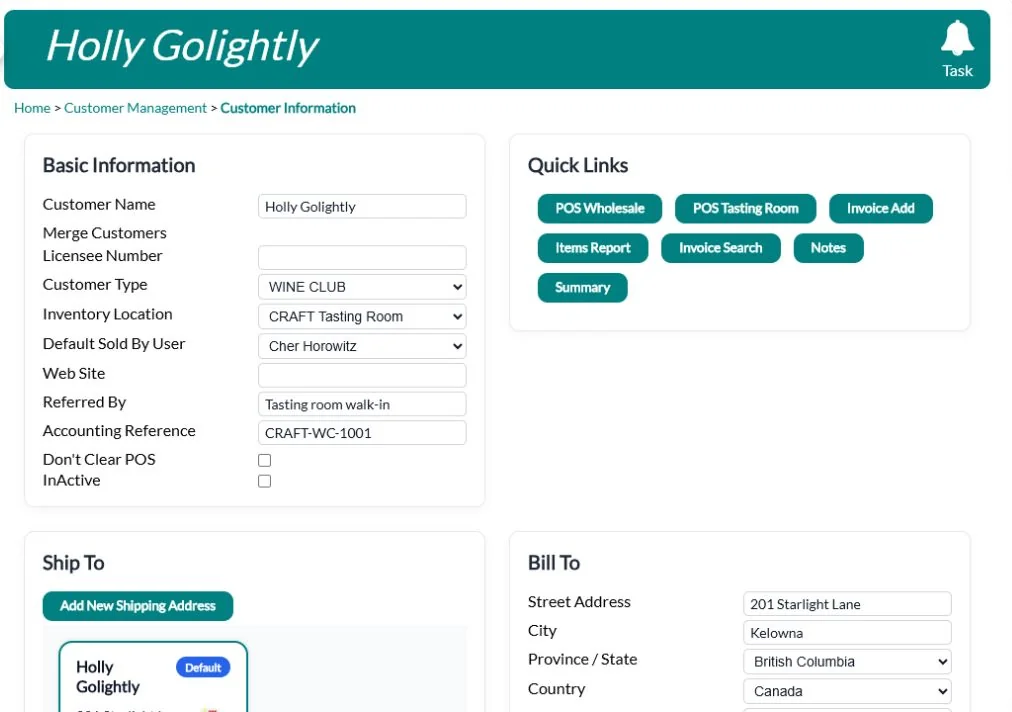
Every customer has one record with notes, activity, tasks and active club memberships. Group customers by type and category, including retail versus wholesale, and target them by birthday or club anniversary. Send campaigns from the built-in email designer and see who opened and clicked.
A customer record can hold several contacts, billing and shipping addresses, documents and photos, a licensee number for trade accounts, preferred delivery days and who referred them. When follow-up is needed, staff create a task with an owner and a due date. If two records turn out to be the same customer, they can be merged. You can email a customer a link to add their own billing details, and the Customer Ordering Trends report compares what customers bought in one period against another.
From a customer’s record, choose one of your mail merge forms and QUALO fills it in with that customer’s details and saves it to their documents, ready to edit or print. The Email History report covers the emails QUALO sends, including invoices and packing slips, and shows whether each one was delivered, opened, clicked or bounced. If your trade accounts are in a spreadsheet, Import Wholesale Customers brings them in using a downloadable template.
Reports and dashboards that answer the real questions
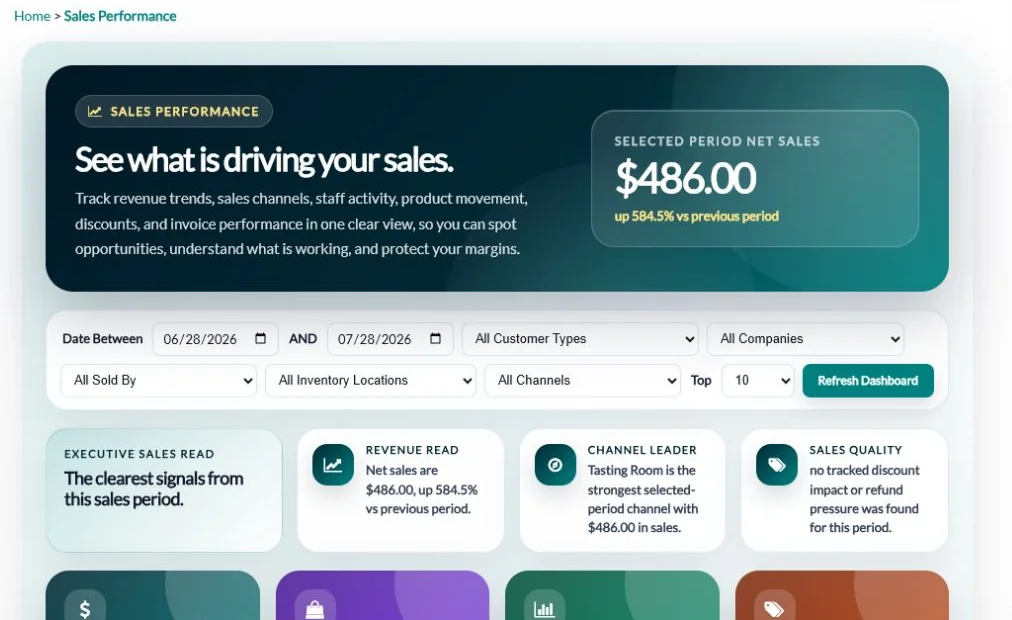
Close to 20 live dashboards, including Owner Overview, Sales Performance, Wholesale Sales, End of Day and Executive Forecast. Sales reports cover case sales, depletion, where-to-buy, price lists, profit and each customer’s last order. Reports export to CSV or Excel.
Other dashboards cover the tasting room, the online shop, invoices and payments, customers and loyalty, inventory, production and supplies, reservations, email marketing, staff and year-over-year sales. You set the company and date range, and links take you through to the invoices, customers or items behind a number. The Where to Buy report lists the accounts carrying a product by city and can show them on a map. The Profit report shows sales and gross profit by product.
Item Summary Sales shows each product’s sales in dollars or cases, can break them out by vintage, and compares them with the previous period. Customer Summary ranks your top 10, 50 or 100 customers for a date range, and you can narrow it by rep, customer type or category. Hourly Sales shows a day’s sales hour by hour for a location next to another date you choose, and Total Sales and Detailed Case Sales let you compare two date ranges.
Liquor-board reporting in seconds
Run the BC LDB report and import LDB invoices, and produce the Alberta AGLC report, without retyping a thing.
The LDB report can be filtered by date, company, customer, customer type, category, product division, location, rep or invoice status, so it covers exactly the sales you need to report. The LDB invoice import starts from a downloadable template and brings LDB orders in as invoices against your wholesale accounts and products, so they count in your sales reports and receivables like any other order. The AGLC report shows either an invoice summary or singles sold for the dates you choose.
Generate LDB Report downloads a CSV file with one line for each product on each invoice, marked as a sale or a return, carrying your licence number, the customer’s licensee number and type, the SKU, quantity and price. You can name customer types anything you like and give each one an LDB export code, so a type called Walk-in Customer still reports as MOS, and pre-order invoices are left out. For Alberta, the AGLC report lists each SKU that carries an AGLC fee, with the fee, alcohol percentage and container type and size.
Your accountant stays in sync
Invoices, payments and tips sync to QuickBooks Online, with an accounting invoice report that breaks out each tax.
Each payment type in QUALO, such as cash, cheque, card or e-transfer, is matched to an account reference in QuickBooks, so payments land where your bookkeeper expects them. If a sync is interrupted, a recovery sync works through the missed records in batches and lets you retry any that failed. The Tax report totals the taxes collected for a period, and the Reconciliation screen helps you match QUALO payments against your cash, card processor and bank totals before you close the month.
Built for your industry: Winery Software · Cidery Software · Brewery Software
If a customer isn’t in QuickBooks Online yet, QUALO adds them the first time one of their invoices syncs, and returns go across as credit memos. If a payment didn’t reach QuickBooks, saving the invoice compares the payments on both sides and resends the missing one. On Payment Search, the QuickBooks button downloads the payments you’ve found as a CSV file with the customer, licence number, payment method, invoice number and amount.
Frequently asked questions
Does QUALO handle BC LDB reporting?
Yes. QUALO produces the LDB report and imports LDB invoices. Alberta AGLC reporting is built in too.
Does it work with QuickBooks?
Yes, QuickBooks Online.
Can I pay sales reps commission?
Yes. Sales are credited to reps, and the Commission report lists each rep’s invoices and totals for any date range, so you can work out what they’ve earned.
Can I see all channels in one report?
Yes. Dashboards combine in-person, online, club and wholesale sales.
Can I import my order history?
Yes. Invoices import from Commerce7, WineDirect, QuickBooks and the LDB.
Can I send customers a statement?
Yes. A statement shows a customer’s invoices, payments and balance, and you can print it or email it.
Can I set sales targets for my reps?
Yes. Quotas set a monthly sales target for a rep or a company, and show actual sales against it.