BC LDB Reporting: A Practical Checklist for Producers
If you sell through BC’s Liquor Distribution Branch, reporting is part of the job. Most of the pain doesn’t come from the reports themselves. It comes from messy data underneath them: products set up inconsistently, deposits handled differently on different orders, and invoices that live in three places. This checklist covers the habits that make LDB reporting quick and accurate.
1. Get your product data right once
Every LDB report is built from your product records, so errors there show up everywhere.
- One product, one record. Each product and size should exist once, with the same name everywhere you sell it.
- Consistent SKUs and codes. Make sure the codes you use internally line up with the codes on your LDB paperwork, and keep a single list of the mappings.
- Correct unit details. Volume and alcohol percentage on every item unit, because reports depend on them.
- Retire old products properly. Mark discontinued items inactive instead of deleting or renaming them, so past reports still make sense.
Do a product clean-up once a year, and whenever you launch something new. Ten minutes checking a new product’s setup saves hours of correcting reports later.
2. Handle deposits the same way every time
Deposits are one of the most common sources of reporting errors. Decide how deposits apply to each type of customer, including LDB orders, and set them up so they’re applied the same way every time, rather than relying on staff to remember.
Then check that your reports include or exclude deposits the way your accountant expects. Pick a recent month, pull a few invoices from each channel, and check the deposits by hand. If the tasting room, online shop and wholesale orders handle deposits differently, fix the setup before the next month-end, not during it.
Write the rules down, with an example for each customer type, so new staff and your bookkeeper apply them the same way.
3. Keep LDB invoices in the same system as everything else
LDB orders recorded on paper or in a separate spreadsheet are the classic source of month-end gaps. Record or import LDB invoices into the same system as your tasting room, online and wholesale sales, so one report covers everything.
Keeping everything in one place also keeps your stock levels right. If LDB orders are tracked separately, the inventory you see doesn’t reflect what has already gone out to the LDB, and you risk promising stock you no longer have.
File the supporting paperwork with each invoice as you record it, not at the end of the month.
4. Set a month-end routine
A routine turns month-end from a scramble into a checklist.
- Receive all transfers and post all deliveries before you run reports.
- Run your LDB report on the same day each month.
- Compare it with your sales and depletion reports, and investigate anything that doesn’t match while it’s still fresh.
- File the report and supporting invoices together.
- Note any corrections you made and why, so the same problem doesn’t repeat next month.
Put the routine in a shared calendar with a reminder a few days before, so it never depends on one person remembering. The first few months may take a while; after that, it becomes a short, predictable job.
5. Know who owns it
Reporting goes wrong when everyone assumes someone else did it. Give one person ownership of the monthly LDB routine, with a backup who knows the steps.
Write the steps down in a simple document: where the data comes from, which reports to run, what to check, and where to file the results. Have the backup run the routine at least once or twice a year, so they’re ready when the owner is on holiday or busy with harvest or a big release.
6. Check the official requirements regularly

Rules, forms and deadlines change. Check the LDB’s current requirements for your licence type at least once a year, and whenever you add a new product category or sales channel.
Keep a short note of what you checked and when, and of any changes you made as a result. If you’re unsure how a rule applies to you, ask the LDB or your accountant before month-end, not after a report has been filed.
Signs your reporting process needs attention
- Month-end reporting takes more than an hour, or always falls to the same person working late.
- The LDB report and your sales report never quite agree, and nobody knows why.
- Deposits are sometimes on LDB invoices and sometimes not.
- You keep a separate spreadsheet just for LDB orders.
- Product names or sizes are spelled differently across your POS, online shop and invoices.
If two or more of these sound familiar, start with clean product data and one system for all sales. Everything else gets easier from there.
A month-end routine template
| When | Task | Owner |
|---|---|---|
| Last business day | Receive outstanding transfers and post deliveries | Operations |
| Day 1 | Import or enter all LDB invoices for the month | Owner of LDB reporting |
| Day 2 | Run the LDB report and compare with sales and depletion reports | Owner of LDB reporting |
| Day 2 | Investigate and correct any differences | Owner of LDB reporting |
| Day 3 | File the report and supporting invoices; note anything unusual | Backup person reviews |
LDB reporting FAQs
Who should own LDB reporting?
One named person, with a trained backup. In smaller businesses this is often the owner or operations manager.
Should deposits appear on LDB invoices?
That depends on the current rules for your products and licence. Check the LDB’s requirements and set your system up to apply them consistently, so staff never decide case by case.
Can we import LDB invoices instead of retyping them?
Some systems can import them directly. Importing removes a whole category of typing errors and saves time every month.
When you add a new product or channel
Most reporting problems start when something new arrives: a new wine, a new can size, a new store account or a new sales channel. Before the first sale, set up the product once with its correct size, alcohol percentage, codes and deposit settings, and check it appears correctly on a test report. Ten minutes of setup prevents months of small mismatches that only show up at month-end.
How QUALO helps
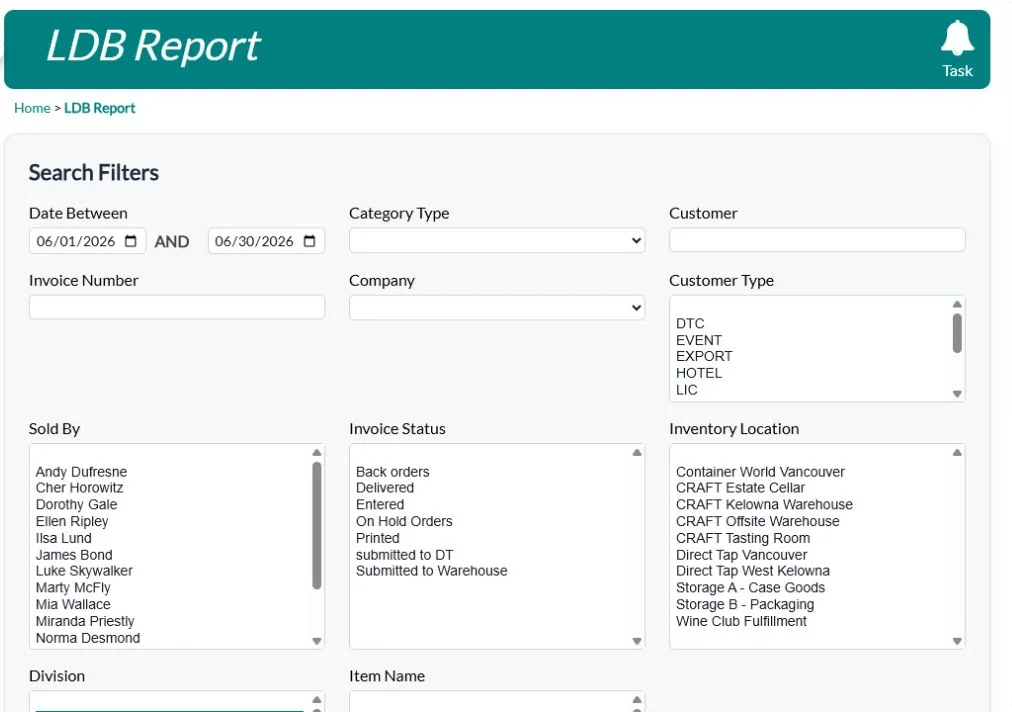
QUALO produces the BC LDB report and imports LDB invoices, so LDB sales sit alongside your tasting room, online, club and wholesale sales. Unit volume, alcohol percentage and deposits are stored on each item. Deposits are calculated automatically, and each customer type can be set to leave them off its orders and out of the LDB report. Alberta AGLC reporting is built in too.
See Wholesale, CRM & Reports · Book a demo