From Brew Day to Can: Tracking Every Batch Without Spreadsheets
Most breweries start with a recipe in brewing software, a fermentation log on a clipboard, a packaging sheet in a spreadsheet, and sales in the POS. It works until it doesn’t: a recipe tweak nobody recorded, a batch that can’t be traced, or cans counted twice. Here’s how to track a batch from start to finish in one connected flow.
1. Start from a versioned recipe
Every batch should start from a recipe version, so you always know exactly what was brewed: grain bill, hop schedule, yeast, water profile and targets for OG, FG, IBU, colour and ABV. When you change a recipe, save it as a new version instead of editing the old one. Six months later, you’ll know which version a batch came from.
Add a short note to each new version saying what changed and why: a different hop because of supply, a lower mash temperature for a drier finish. Those notes turn your recipe history into a record of what worked.
When you’re happy with a change, make the new version the current one, so nobody brews from an old version by mistake.
2. Plan the water
Water chemistry is one of the easiest things to get wrong between batches. Save the water profile you’re aiming for and record the mineral additions you made, so the next brewer can repeat it exactly.
Get a water report from your supplier, or test your water yourself, at least once a year and whenever a beer’s taste changes for no clear reason. Municipal water can change with the seasons.
Keep target profiles with the recipe, and record what was actually added on each brew day. If a batch tastes different, the water record is one of the first places to look.
3. Create the batch from the recipe
Scale the recipe to your brew length and create the batch directly from it, so targets, ingredients and the recipe version travel with the batch. No retyping.
On brew day, record what actually happened next to the targets: the mash temperature you hit, gravity readings, and any substitutions, such as a different malt lot or a hop swapped for availability. The gap between plan and reality is where the learning is.
Record the ingredient lots you used, too. If a malt or hop supplier ever has a quality problem, you’ll know which batches it went into.
4. Log fermentation as it happens
Record gravity, temperature and pH readings against the batch, not in a notebook. Consistent readings make it easy to spot a stuck fermentation early, and to compare batches of the same beer over time.
Agree on when readings are taken, for example every morning at the same time, and what counts as a problem worth flagging. A short note with each reading, such as “slow activity” or “raised temp by 1°”, helps whoever is on shift tomorrow.
Look back at the readings when a batch finishes. Comparing fermentation curves between batches of the same beer is one of the quickest ways to find what made a good batch good.
5. Assign the work
Turn dry hopping, transfers, cleaning and packaging into work orders on a shared board, so the whole team can see what’s due today and what’s done.
Each work order should say what needs doing, to which vessel or batch, by when, and who’s doing it. When it’s done, the person who did it marks it complete and notes anything unusual.
That record matters later. If a batch has a problem, you can see exactly when it was dry hopped, transferred or cleaned, and by whom, instead of relying on memory.
6. Package into lot-numbered stock
When you package, record exactly what came out: cans, bottles and kegs, each with a lot number tied to the batch. That stock should flow straight into the inventory your taproom, online shop and wholesale accounts sell from, so packaging numbers never get retyped.
Record losses too: cans rejected for low fills, bottles broken on the line, beer left in the tank. Knowing your real yield per batch helps you plan production and spot equipment problems early.
Plan packaging runs around what you expect to sell in the next few weeks. Fresh beer sells better, and stock that sits too long ends up discounted or poured away.
7. Track your kegs
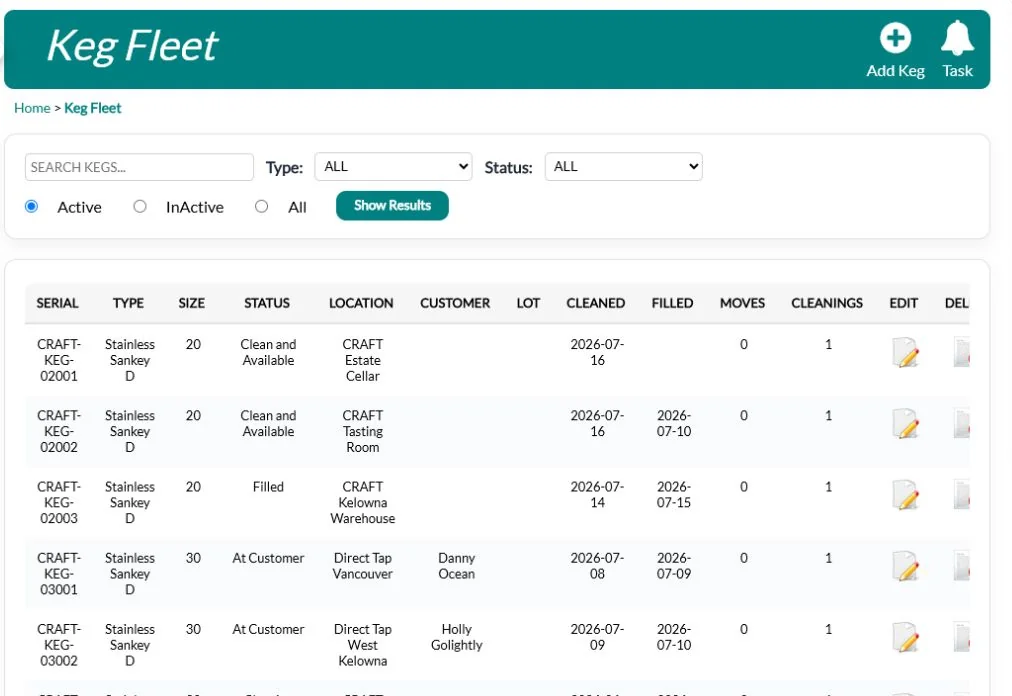
Kegs are expensive and easy to lose. Track each keg’s size, status, which customer has it, its deposit, and when it was last cleaned and filled, with a QR code reference and RFID tag number stored for each shell.
Review your keg list every month. Which accounts have had kegs for too long? Which kegs haven’t been seen in months? A friendly reminder to an account often brings back kegs that would otherwise be written off.
Set clear rules for deposits and returns with every account, and stick to them. A missing keg costs far more than the beer that was in it.
The payoff
When recipe, batch, packaging and sales are connected, you can answer questions in seconds: which batch is in this can, what it cost to make, and whether this batch matched the last one.
A batch record template
Whatever system you use, every batch record should answer these questions:
| Section | What to record |
|---|---|
| Recipe | Recipe name and version; scaled brew length |
| Brew day | Date, brewer, actual mash and boil details, gravity readings, any deviations |
| Water | Water profile used; mineral additions and amounts |
| Fermentation | Yeast and pitch details; gravity, temperature and pH readings with dates |
| Conditioning | Dry hop additions, transfers, finings, carbonation |
| Packaging | Date, format (cans, bottles, kegs), quantities, lot number |
| Sales | Where each lot went: taproom, shop, accounts |
Mistakes that break batch tracking
- Editing recipes in place. If you overwrite a recipe, old batches point to a recipe that no longer matches what was brewed.
- Recording readings later. Readings written up at the end of the day are often rounded, guessed or missed.
- Packaging numbers retyped into inventory. Every retype is a chance for an error between what you packed and what you sell.
- No lot number on finished goods. Without a lot number, you can’t connect a can on the shelf to the batch that made it.
- Kegs tracked on a whiteboard. Missing kegs are expensive, and whiteboards don’t remember who had a keg last month.
Batch tracking FAQs
Do I need a lot number on every can?
Each packaging run should have a lot number recorded against the stock it created. How you mark it on the package depends on your labelling setup and any rules that apply to you.
Can I keep using my brewing software for recipes?
Yes. Importing recipes, for example from BeerSmith or BeerXML files, lets you keep your recipe tool while tracking production and sales in one system.
How do I compare batches of the same beer?
Use the same recipe and record the same readings at the same points every time. Consistency in what you record matters more than how much you record.
How QUALO helps
QUALO keeps versioned beer recipes with water profiles, a mineral-addition calculator and fermentation profiles, and imports recipes from BeerSmith, BeerXML and BrewCipher. Scale a recipe and create a batch from it, log readings, assign work orders, and package into lot-numbered cans, bottles and kegs that move straight into sellable inventory. The keg fleet tracks every keg’s customer, deposit and cleaning history.
See Brewery Software · See Production · Book a demo