Brewery Keg Tracking: Locations, Deposits and Returns
A keg tracking system should answer four questions: where is the shell, what beer was filled into it, who has it now, and what needs to happen before it is filled again? A stock count alone cannot answer all four. Track the reusable keg separately from the beer inside it, and keep a movement history for each shell.
This guide covers a practical workflow for craft breweries, whether you are improving a spreadsheet or choosing brewery keg tracking software.
Give every keg a permanent identity
Use a unique keg ID that stays with the shell through filling, dispatch, return and cleaning. Keep its size and type alongside that ID. The beer changes each time you refill a keg; the identity of the container should not.
Agree on the same ID format across the brewhouse, warehouse and delivery team. If the physical marking is unreadable, resolve the identity before recording the next movement rather than guessing which keg it is.
What to record in a keg register
| Record | Why it matters |
|---|---|
| Keg ID, serial number, size and type | Identify the shell and its capacity. |
| Status and current location | Distinguish full, out with a customer, returned, awaiting cleaning and ready to fill. |
| Current customer and dispatch reference | Connect a keg outside the brewery to the account and delivery that received it. |
| Beer lot and last fill date | Connect the contents to the packaging run and production batch. |
| Deposit record | Keep the account’s deposit activity alongside the keg movement. |
| Last cleaning and inspection | Show the work recorded before the next fill. |
| Movement history | Keep a dated trail rather than overwriting the previous location. |
Treat those statuses as a starting point for your team’s process. A location says where a keg is; a status says what can happen to it next. “At the brewery” alone does not distinguish a full keg ready to ship from a returned shell awaiting cleaning.
Follow the shell from filling to return
- Fill: connect the keg ID to the beer lot, fill date and filled quantity. Follow the lot back to its production and packaging record.
- Dispatch: record the customer, date, delivery reference and deposit arrangement. Update the location when the keg leaves.
- Return: match the physical keg ID to the account and record the return. Check discrepancies while the delivery details are still available.
- Clean and inspect: record the work performed and its result under your brewery’s cleaning and quality procedures.
- Refill or retire: only return a shell to the fill workflow after the required checks. Keep the history if a damaged keg is retired.
Example: an empty return does not restore beer stock
Suppose a brewery sends three 20-litre kegs to a pub: IDs K101, K102 and K103. The delivery contains 60 litres from packaging lot PA-01. Later, the pub returns K101 and K102 empty.
The register should show two returned shells at the brewery and one shell still at the pub. It should not add 40 litres of beer to sellable inventory. Any deposit credit follows the brewery’s agreed account terms; it is a separate record from beer quantity.
When K101 is cleaned and filled with a different beer, keep its earlier movements and attach the new fill to the new lot. That is why a keg ID and a beer lot need separate fields.
A weekly keg reconciliation
- Count shells by location and status, including full stock, returned empties, cleaning and repair.
- Compare dispatch and return records with delivery paperwork.
- List kegs still assigned to each trade account and investigate unusually long stays.
- Review missing IDs, incomplete cleaning records and movements without a customer or reference.
- Assign each discrepancy to someone and record the resolution.
Set your follow-up interval around your delivery cycle and account agreements. A consistent review is more useful than a list that grows without anyone owning the exceptions.
What to ask in a keg tracking software demo
Bring a normal delivery and a partial return. Ask to see one keg’s location, customer, deposit, last cleaning and fill, then its full movement history. Check how the beer lot connects to packaged inventory and the trade invoice or delivery record.
If you need barcode, QR or RFID scanning, ask the supplier to demonstrate the exact device and workflow you intend to use. Storing a code or tag reference does not, by itself, demonstrate an automated scanning integration.
How QUALO tracks brewery kegs
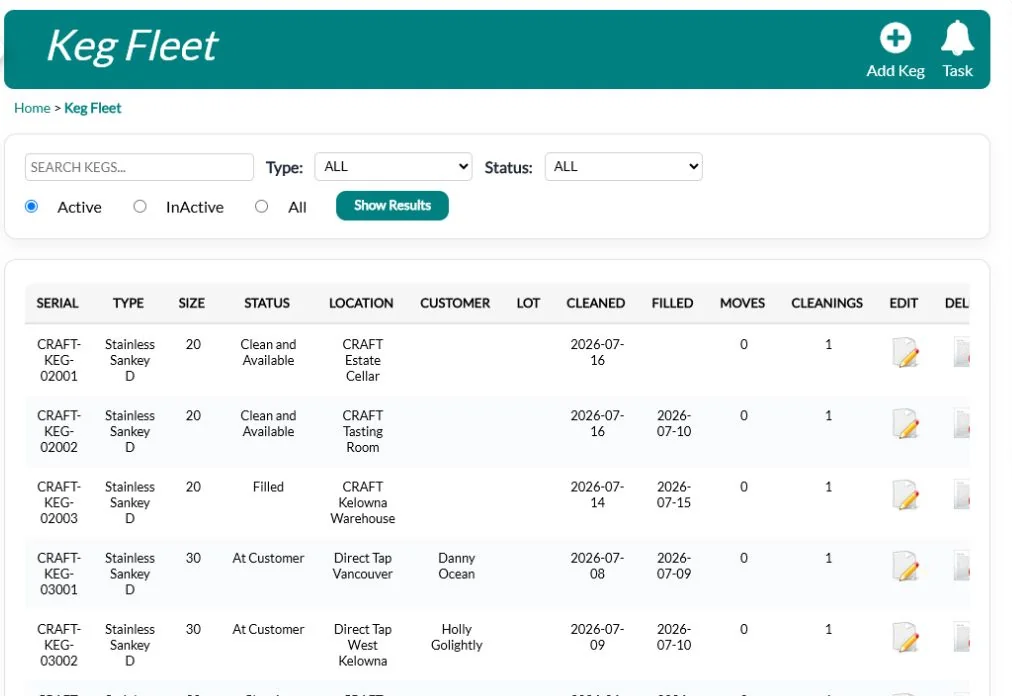
QUALO’s keg fleet records each keg’s size, status, current customer, deposit, last cleaning and last fill. It stores serial numbers, QR code references and RFID tag numbers. Movement logs preserve where a keg has been, and cleaning and inspection logs record the work and pass or fail result.
These records sit alongside brewery management workflows for recipes, batches, packaging, taproom POS and wholesale sales. Review the modules and what is included to choose the workflows your brewery needs.
See a keg dispatch and return in QUALO
Keg tracking questions
Is a keg deposit the same as a keg inventory record?
No. The deposit records an account transaction; the keg register records a physical shell and its movements. Reconcile both so a credit does not stand in for a missing return record.
Can we start with a spreadsheet?
A register with permanent IDs, dated movements and an owner for each exception is a useful starting point. When several teams update separate copies, compare the effort of keeping them consistent with a shared system.
How does keg tracking help traceability?
A fill record connects a shell to a beer lot. Dated dispatch records then help identify which accounts received that lot. Keep the batch, packaging and sales records connected as described in our lot traceability guide.